
You're running ads for your MedSpa, posting on Instagram, and maybe even ranking for a few treatments. But what about "Botox in [Your City]" or "Laser Hair Removal near me"?
If your website doesn't have dedicated local landing pages for each service and location, you're missing out on high-intent leads, people actively searching for your treatments right now.
These individual service + city pages are the foundation of strong local SEO for MedSpas. They help your clinic appear in Google's Map Pack and top local search results, right where nearby clients are ready to book.
So, how do you create effective local landing pages?
To create MedSpa-optimized local landing pages, build individual service + city pages tailored to local search intent. Combine precise keyword targeting, localized content, authentic trust signals, and a clean, conversion-driven design that turns visitors into consultations.
In this guide, you'll learn exactly how to plan, write, and optimize MedSpa local landing pages that attract local patients, outrank competitors, and keep your appointment calendar full, even without paid ads.
1. Build Your MedSpa Service + Location Keyword Plan
Before writing a single line of content, you need a clear plan showing which services you'll target and where. This helps you avoid duplicate pages, ensures complete coverage across your market, and makes it easy to scale as you expand into new cities.
Start by creating a simple spreadsheet with these columns:
City/Neighbourhood | Service | Primary Keyword | Variations | Google Business Profile URL
Then, fill in one row per opportunity. Here's an example:
Local SEO Targets - High-Intent Services by Location
Tips for building your keyword plan:
- Use location + service combinations: "Botox Miami," "Laser Hair Removal Austin," "Facials Dallas."
- Check the SERP manually: Look at the Map Pack, competitor pages, and ads to spot ranking gaps.
- Link each service to its Google Business Profile (GBP): This helps align your on-page SEO with your local listing later.
Once this spreadsheet is complete, you'll have a clear blueprint showing exactly which service + city pages to create, and the keywords that will drive the most qualified leads.
2. Create and Structure Your MedSpa Local Landing Pages for Conversions
Once your keyword plan is ready, the next step is turning each row into a high-converting local landing page. To make this scalable, start with a strong brief and follow a consistent structure that guides both writers and designers.
Step 1: Build a Clear Page Brief
Before writing, outline:
- Goal: What you want visitors to do (book, call, or fill out a form).
- Primary Keyword: The main "service + city" phrase (e.g., Botox in Miami).
- Variations: 3-5 related long-tail phrases.
- Angle: Choose a consistent tone (safety, expertise, natural results, modern techniques).
- Proof Assets: Add 2 testimonials, a before-and-after photo, and a doctor or staff quote.
- Local Touches: Mention landmarks, parking info, or neighbourhoods.
- CTAs: "Book Now," "Request a Consultation," "Call Us."
- Internal Links: Note related services and pillar pages to connect.
- Schema Needed: LocalBusiness, Service, and FAQ.
This brief ensures consistent branding, SEO alignment, and easy delegation to writers or designers.
Step 2: Apply a Proven Page Structure
Use a layout that balances readability, authority, and conversion:
- H1: [Service] in [City]
- Intro: 2-3 lines summarising treatment benefits and local expertise.
- Benefits (H2): Highlight 3-4 key outcomes clients care about.
- How It Works (H2): Explain the process in short, reassuring steps.
- Who It's For (H2): Describe ideal candidates and concerns.
- Results & Safety (H2): Add before-and-after photos, credentials, and care details.
- Local Trust Builders (H2): Include landmarks, testimonials, and staff quotes tied to your city.
- FAQs (H2): 4-6 questions that naturally use the city name.
Step 3: Design for Maximum Conversions
Optimise UX so every visitor knows what to do next:
- Primary CTA above the fold.
- Sticky header with "Book" and "Call" buttons.
- Trust row showing reviews and certifications.
- Before-and-after gallery near CTAs.
- Short booking form with only essential fields.
- Social proof like client testimonials or media mentions.
- Mobile-first design with fast load times and clear CTAs.
3. Optimize On-Page SEO for Every MedSpa Location Page
Every MedSpa location page should clearly tell Google, and potential clients, who you are, where you are, and what you offer.
Strong on-page optimization ensures your pages rank higher for "[Service] in [City]" searches and appear consistently across all locations.
On-Page SEO Checklist for Each Page
On-Page SEO Essentials
- URL slug: Use a consistent format like /city/service or /service-city, and keep it short and clean.
- Title tag: [Service] in [City] | [Clinic Name] - include a clear benefit (e.g., Safe, Natural Results).
- Meta description: 150-160 characters summarizing service, location, benefit, and a strong CTA.
- H2 headings: Benefits, How It Works, Why Choose [Clinic Name] in [City], FAQs.
- Image alt text: Naturally include service + city keywords (e.g., Before and after Botox in Miami).
- Internal links in: From your main service page, city hub, and relevant blog posts.
- Internal links out: To other related treatments in the same city and your Google Business Profile.
- NAP block: Add your exact Name, Address, and Phone - matching your GBP - plus a Google Map embed.
- Performance: Test page load speed (especially mobile), layout stability, and clickable CTAs.
How We Take Optimization Further at MedSpa Market Pro
At MedSpa Market Pro, we go beyond basic on-page SEO by using SurferSEO and similar optimization tools to:
- Benchmark your content against real top-ranking local competitors.
- Identify NLP keywords and semantic terms to enrich your content naturally.
- Adjust keyword placement, word count, and structure for maximum visibility.
- Maintain a professional, authentic tone while achieving ideal keyword density.
- Audit your entire local page network for internal link flow and topical authority.
This advanced approach ensures every MedSpa local landing page not only ranks but outperforms competing clinics in Google's Map Pack and organic results.
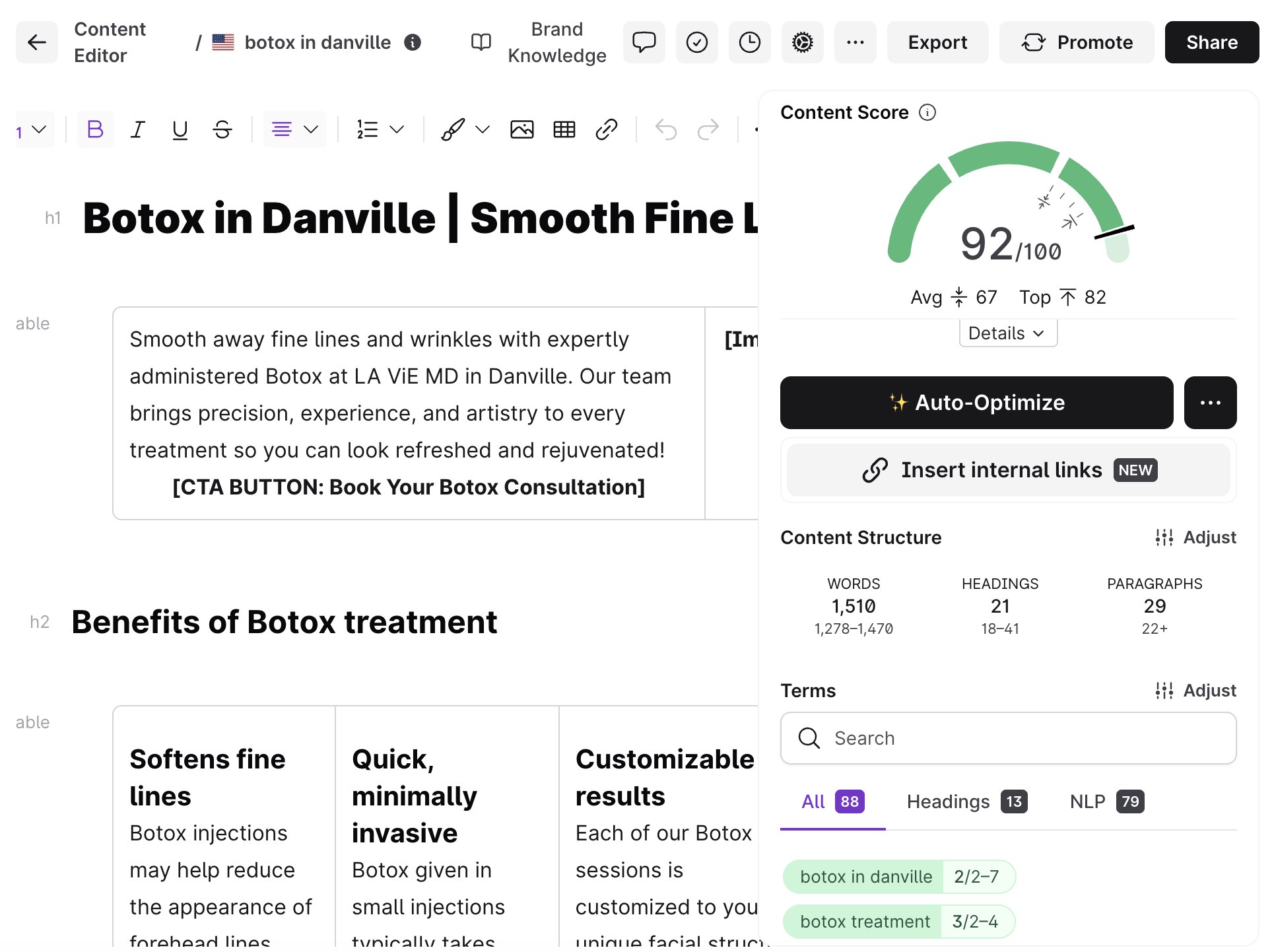
Here's a glimpse of how we use SurferSEO to benchmark MedSpa content against real local competitors. Each page we create is optimized for keyword intent, content depth, and topical authority, ensuring your MedSpa ranks higher for "service + city" searches.
Want to see how this process works in practice? Learn more about our MedSpa Local Landing Pages Service and discover how we help clinics rank locally and convert visitors into loyal clients.
Once your pages are fully optimized, it's time to connect them with your local listings to strengthen your authority in search results.
4. Sync Your Google Business Profile and Citations with Local Pages
Your Google Business Profile (GBP) and website work hand in hand. When both share the same business information and link structure, Google trusts your MedSpa more, improving your visibility in local results and the Map Pack.
Follow these steps to align your GBP and local pages:
1. One Google Business Profile per location. Create or claim a unique GBP for each MedSpa branch or city you serve. This helps you appear in local searches for each area individually.
2. Match your NAP exactly. Use the same Name, Address, and Phone number (NAP) on your website, GBP, and every citation platform (Yelp, RealSelf, Facebook, etc.). Even small differences, like abbreviations or punctuation, can weaken your local ranking signals.
3. Link to the correct local landing page. Each GBP should link directly to the corresponding service + city page, not your homepage.
For example:
- Miami GBP → /miami/botox
- Austin GBP → /austin/laser-hair-removal
4. Keep categories, hours, and services updated. Use accurate categories (e.g., Medical Spa, Laser Hair Removal Service), add service descriptions, and ensure your opening hours match your website
5. Build and update citations. List your clinic on trusted local directories and health-related platforms. Prioritize quality over quantity. Google values consistency more than volume.
6. Add links from citations to local pages. Whenever possible, include a link back to your corresponding city page instead of your homepage. This reinforces your local authority.
When your website, GBP, and citations all share the same NAP, categories, and links, you send strong trust signals to Google, helping your MedSpa dominate local search results and attract nearby clients.
5. Launch, Index, and Promote Your MedSpa Location Pages
Even the best local landing page won't generate results if it's hidden from search engines or disconnected from the rest of your site.
After publishing, take these steps to ensure your MedSpa location pages are indexed properly and gain traction fast.
1. Strengthen Internal Linking
Connect your new pages across your website:
- From city hub pages (e.g., /locations/) listing all your service areas.
- From service pillar pages linking to each city version.
- From your header or footer if you have multiple clinic locations.
Internal linking not only helps users navigate easily but also passes SEO authority to your new pages.
2. Add to Your Sitemap and Submit to Google
Include every location page in your XML sitemap and resubmit it in Google Search Console. This signals to Google that your page is ready to be indexed.
3. Request Indexing for New URLs
Use the URL Inspection tool in Search Console to request manual indexing. New pages can appear in search results within a few days.
4. Build Internal Support from Blog Posts
Write or update one or two related blog posts that link naturally to your city page (e.g., "Learn more about our Botox treatments in Miami"). This adds contextual relevance and reinforces your local SEO signals.
5. Promote Your New Pages on Owned Channels
Once live, share your new city pages across your existing channels:
- Add them to your navigation or sidebar menus.
- Mention them in newsletters or patient follow-up emails.
- Highlight them on social media to drive local awareness and clicks.
6. Monitor Indexing and Performance
Check Google Search Console regularly to confirm:
- The page is indexed.
- Impressions and clicks are increasing for "service + city" queries.
- Internal links and crawl activity are consistent.
By connecting, submitting, and promoting your local landing pages right after launch, you help Google index them faster, and start building authority and visibility in your target markets within weeks.
At MedSpa Market Pro, we offer a comprehensive solution so you don't have to worry about your marketing. From optimizing your high-revenue landing pages and managing your Google Business Profile to creating supportive blog content and distributing it across social media, email, and paid channels, we handle every part of your visibility system so your clinic can focus on what matters most: your patients.
6. Track and Improve Your Medical Clinic Local SEO Results
Once your MedSpa local landing pages are live and indexed, ongoing tracking is essential. SEO isn't a one-time setup. It's a process of measuring what works, improving what doesn't, and reinforcing the pages that drive real results.
Here's what to monitor:
1. Search Visibility and Traffic
Use Google Search Console to track:
- Impressions and clicks for each "service + city" keyword.
- Average position for your key pages.
- Queries that are driving new traffic or showing early movement.
2. Map Pack Performance
From your Google Business Profile Insights, monitor:
- Views on Maps and Search.
- Clicks to your website.
- Calls, direction requests, and bookings coming directly from your GBP.
3. On-page Engagement Metrics
In Google Analytics or GA4, check:
- Average time on page (high dwell time signals quality).
- Bounce rate and scroll depth (helps identify weak sections).
- Clicks on CTAs and contact forms.
4. Leads and Conversions
Use your booking system, CRM, or form submissions to measure:
- Number of consultations or calls from each location page.
- Conversion rate (leads ÷ total visits).
- Cost per lead if combined with paid campaigns.
5. Refresh and Optimize Quarterly
Every 3 months, review your keyword rankings and update:
- Content that's underperforming or outdated.
- FAQs based on new client questions.
- Internal links from new blog posts or service pages.
- Testimonials, before-and-after images, and staff details.
Target benchmarks by 90 days:
- Top 5 ranking for your main "Service in City" keyword.
- 2–5 new bookings per month per page.
- Consistent visibility in the Google Map Pack.
Continuous improvement ensures your MedSpa local pages remain competitive, relevant, and profitable, turning your website into a reliable source of organic, location-based leads.
You may also like: How to Rank for Local Treatments with Medspa SEO
Bonus: Quick SEO Health Check for Med Spa Local Pages
- Make sure each title tag, H1, and meta description includes the city name naturally.
- Check that all pages link to your Google Business Profile and have a visible map embed.
- Review internal links and NAP consistency across your site and citations.
A short quarterly review like this prevents the small errors, duplicate content, missing links, or outdated details, that can slowly hurt your rankings over time.
More tips here: Ultimate Local SEO Checklist for Medspas
Bring Your MedSpa to the Top of Local Search Results
Building effective MedSpa local landing pages isn't just about SEO. It's about creating a system that continuously attracts new patients from nearby searches. When every page is optimized for your services, city, and client intent, your website becomes a lead engine that works 24/7.
By following this guide, from keyword planning and content structure to UX design optimization, you can build service + city pages that dominate Google's Map Pack and convert traffic into appointments.
Your future patients are already searching. Make sure your MedSpa is the one they find first.
Ready to attract more local patients? Download the free 2026 MedSpa Growth Blueprint and get the full system for building SEO-optimized landing pages, ranking higher locally, and turning searchers into booked appointments.
FAQ
Yes. Each city or neighborhood you serve deserves its own optimized page targeting "service + city" keywords. This helps your medspa rank in Google's Map Pack and attract local clients ready to book.
Most MedSpa pages start showing visibility within 30-60 days after publication if properly optimized and linked to your Google Business Profile. Full ranking potential usually develops within 3-6 months.
No. Reusing the same text across pages can trigger duplicate-content issues. Each page should include unique local details - landmarks, client testimonials, staff names, or parking info - to signal genuine local relevance.
A service page explains a treatment in general; a local landing page targets that service for a specific city (for example, "Hydrafacial in Austin"). Both are important for SEO but serve different purposes.
We combine SEO, paid ads, social media, and email marketing into one integrated strategy. By optimizing your landing pages, local listings, and content distribution, we help your MedSpa rank higher, generate qualified leads, and maintain steady patient growth.